
Every B2B SaaS has one screen where the whole product happens. In this post's case — a messaging platform used by sales teams — that screen is the inbox: the list of conversations users keep open all day. In mature workspaces, that list accumulates ~20,000 conversations. And the original version loaded all of them at once.
This post documents the rebuild of that screen from a frontend perspective: why offset-based pagination wouldn't cut it, what the cursor-based API contract looks like, the implementation with React Query and TanStack Virtual, and the trade-offs accepted along the way. The result: payload dropped from ~6.7 MB to ~19 KB per request (~400x), and the UI freezes disappeared.
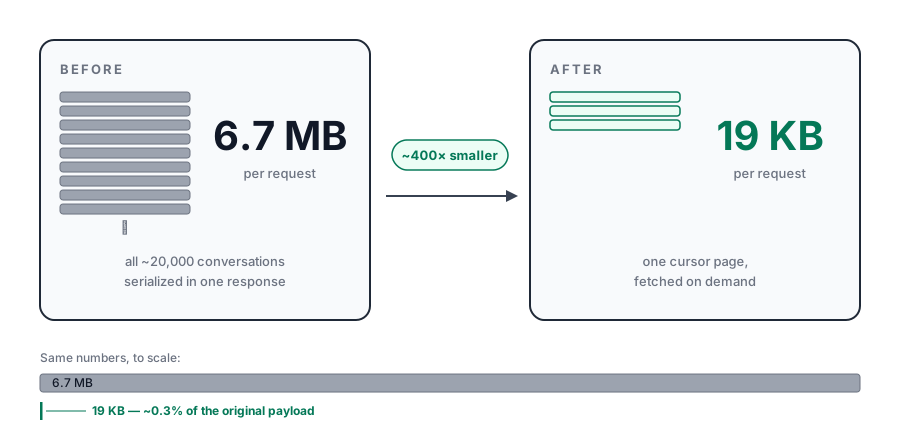 Payload per request before and after: 6.7 MB versus 19 KB (~400x), with a to-scale comparison
The problem: loading everything at once
The symptom was visible to the naked eye: opening the inbox in a large workspace took several seconds, and the interface froze during rendering. DevTools told the rest of the story: a single ~6.7 MB JSON response, and the Performance profiler showing long tasks blocking the main thread while React mounted thousands of rows.
The root cause was an endpoint with no pagination: the listing returned every conversation in the workspace, and the client rendered the entire list. That design has a treacherous property: it silently gets worse as the product succeeds. With 500 conversations, nobody notices. With 20,000, the product's most important screen becomes its slowest.
Two distinct costs were tangled together, and separating them matters because the fixes are different: the network and serialization cost (downloading and parsing 6.7 MB) and the rendering cost (keeping ~20,000 components mounted in the DOM). Pagination fixes the first. Only virtualization fixes the second.
Why not offset-based
The obvious first idea would be ?page=3&limit=50. For an inbox, offset-based pagination fails on two counts:
- Growing read cost —
OFFSET 10000forces the database to walk through and discard 10,000 rows before returning the next 50. Pages get slower the deeper the user goes. - Instability under concurrent writes — an inbox receives new messages constantly, and every insert shifts the offset: items show up duplicated or vanish between one page and the next. Exactly the kind of intermittent bug nobody can reproduce.
Cursor-based (keyset) pagination solves both: instead of counting rows, each page starts from a stable pointer to the last loaded record. Read cost stays constant and new inserts don't shift anything.
The API contract
The cursor is opaque to the client: an encoded string only the backend knows how to interpret — in practice, the sortable pair (updated_at, id), with id breaking ties between records with the same timestamp. The contract the frontend consumes:
// GET /conversations?workspaceId=...&cursor=...&limit=50
type ConversationsPage = {
  items: ConversationPreview[]
  nextCursor: string | null // null => last page
}

// The list never receives the full conversation:
// only the fields the row actually renders
type ConversationPreview = {
  id: string
  contactName: string
  lastMessageSnippet: string
  lastMessageAt: string
  unreadCount: number
  status: "open" | "closed" | "snoozed"
}
One detail with outsized impact: the list never receives the full conversation, only the fields the row displays. The ConversationPreview type exists for exactly that — preventing the listing payload from growing alongside the full conversation model. Payload shaping and pagination combined are what produce the ~19 KB per page.
Data fetching with React Query
useInfiniteQuery was built for exactly this shape: each page declares where the next one comes from via getNextPageParam, and the library handles caching, deduplication and loading states:
function useConversations(workspaceId: string) {
  return useInfiniteQuery({
    queryKey: ["conversations", workspaceId],
    queryFn: ({ pageParam }) =>
      fetchConversations({ workspaceId, cursor: pageParam, limit: 50 }),
    initialPageParam: null as string | null,
    getNextPageParam: (lastPage) => lastPage.nextCursor,
  })
}

// Pages arrive as an array of arrays;
// the list consumes a single flat array
const allRows = data ? data.pages.flatMap((page) => page.items) : []
The central point of this design is that accumulation happens in the cache, not in the DOM: scrolling deep into the inbox adds pages to React Query, but — as the next section shows — the number of rendered elements stays the same.
Virtualization with TanStack Virtual
Pagination alone reduces the payload, not the rendering cost: scroll far enough and the accumulated pages rebuild the original problem, row by row, inside the DOM. The answer is windowing — rendering only the rows visible in the viewport (plus a small overscan margin), absolutely positioned inside a container that keeps the list's full height, which keeps the scrollbar honest.
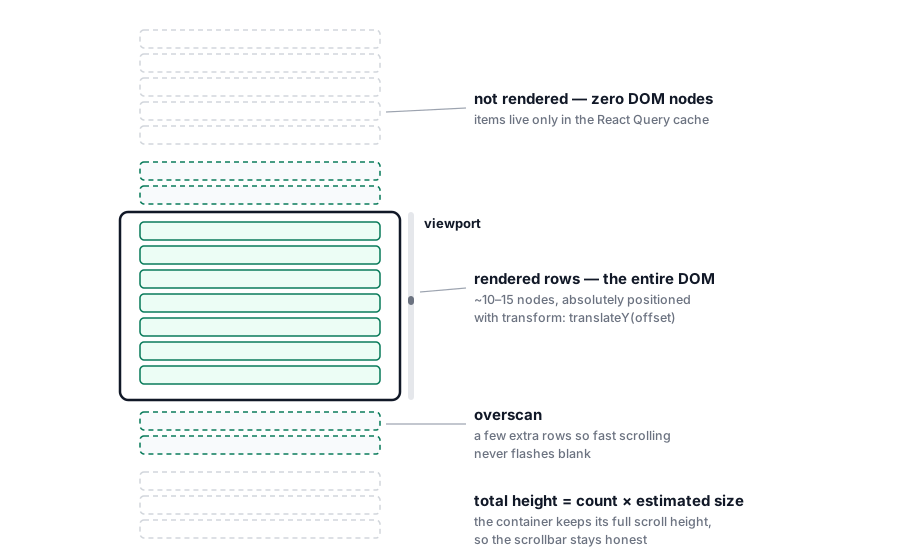 Virtualization diagram: out of ~20,000 conversations, only the rows inside the viewport (plus overscan) exist in the DOM
With @tanstack/react-virtual, the useVirtualizer also becomes the natural trigger for pagination: when the last virtual item approaches the end of the loaded list, the next page is requested:
const parentRef = useRef<HTMLDivElement>(null)

const virtualizer = useVirtualizer({
  count: hasNextPage ? allRows.length + 1 : allRows.length,
  getScrollElement: () => parentRef.current,
  estimateSize: () => 88, // row height estimate; measureElement refines it
  overscan: 8,
})

const virtualItems = virtualizer.getVirtualItems()

useEffect(() => {
  const last = virtualItems.at(-1)
  if (!last) return
  if (last.index >= allRows.length - 1 && hasNextPage && !isFetchingNextPage) {
    fetchNextPage()
  }
}, [virtualItems, allRows.length, hasNextPage, isFetchingNextPage, fetchNextPage])

return (
  <div ref={parentRef} className="h-full overflow-auto">
    <div style={{ height: virtualizer.getTotalSize(), position: "relative" }}>
      {virtualItems.map((row) => (
        <ConversationRow
          key={allRows[row.index]?.id ?? "loader"}
          ref={virtualizer.measureElement}
          data-index={row.index}
          conversation={allRows[row.index]}
          style={{
            position: "absolute",
            top: 0,
            transform: `translateY(${row.start}px)`,
          }}
        />
      ))}
    </div>
  </div>
)
Two decisions in that snippet deserve comment. The count includes one extra row whenever there's a next page — it becomes the loading skeleton at the end of the list. And measureElement measures each row's real height after mount, because inbox rows don't have a fixed height (one- or two-line snippets, badges, states). estimateSize only needs to be good enough for the first paint.
Results
- Payload per request: from ~6.7 MB to ~19 KB (~400x)
- UI freezes gone — with a stable DOM of ~10–15 rows, rendering long tasks disappeared from the profiler
- Opening the inbox stopped taking several seconds, even in the largest workspaces
- The screen's cost stopped scaling with workspace size: 500 or 20,000 conversations, the same work per frame
Trade-offs accepted
None of these choices comes free, and it's worth recording what you give up:
- No jumping to an arbitrary page — a cursor can't answer "take me to page 37". For an inbox, navigated as a chronological stream with search and filters on top, this never hurt; for an admin table, it would be a real problem.
- Virtualization adds genuine complexity — dynamic height measurement, scroll restoration, calibrated overscan. It's engineering cost that only pays off when the list is genuinely large.
- What's not in the DOM doesn't exist for the browser — the page's Cmd+F can't find unrendered rows, and screen readers need extra care (
aria-setsize/aria-posinsetfor the counts). The product's own search becomes the real search.
When to use none of this
If your list holds a few hundred items, stop at payload shaping and simple pagination — virtualization is an answer for thousands of rows, not a default pattern. The rule of thumb I've settled on: cursor-based pagination when the list grows without a ceiling as the product gets used; virtualization when a single list threatens to put ~1,000+ nodes in the DOM.
What deserves attention on a second pass
Two points worth care in any implementation of this architecture: scroll restoration across navigations — returning from a conversation to the list should put the user exactly where they were, which requires persisting the offset outside the component, since the virtualizer doesn't survive unmount — and surgical realtime invalidation: new messages arriving over WebSocket should update the right page of the cache with setQueryData, not invalidate the whole query and redo the work pagination just saved.
The lasting lesson is less about libraries and more about separating costs: network, serialization and rendering degrade through different mechanisms and are fixed with different tools. Cursor-based pagination takes care of what travels; virtualization takes care of what renders. Together, they turned the product's heaviest screen into its most stable one — and its cost stopped tracking customer growth.